Introduction
This tutorial explains the roles of the Vsystem components and how they provide the necessary tools for creating control display windows and real-time databases. You will walk through creating a simple Vsystem database with a standard text editor. You will also learn how to use Vdraw to create a simple control display window and how to link this window to the Vsystem database. In addition, you will learn to use the Valarm alarm monitoring program and the Vscript scripting facility.
Note To obtain the correct results as you perform the exercises in this tutorial, you must proceed through the instructions in a linear fashion; each chapter builds on the processes you performed in the previous chapters
|
This chapter discusses the roles of the Vsystem components, provides the background for the example database used throughout the manual, and introduces the remaining chapters.
Note Please keep in mind that the systems you will be setting up in your work place will be much more complex than what you do in this tutorial. Vsystem has a number of utilities and graphical interfaces to make your setups easy; these utilities are explained in detail in the Vsystem User's Guides
|
The Vsystem Components
This section describes the role of each Vsystem component in assisting you to create and monitor a control system. Vsystem combines an extensive yet easy-to-use graphics package with a networked, open, real-time database. You can easily create control display windows and link them to the Vsystem real-time database without programming. And you can modify these control display windows to fit the changing needs of a project.
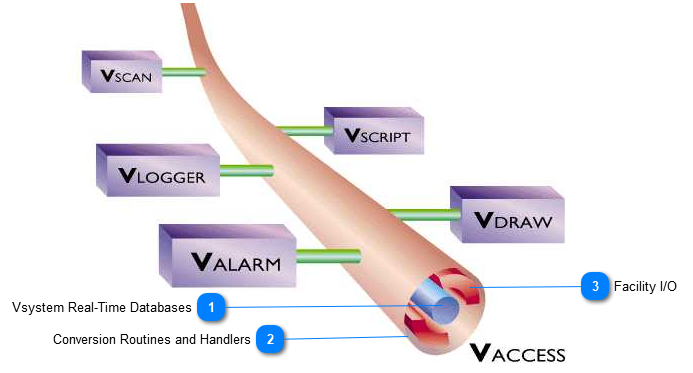
At the heart of Vsystem lies Vaccess, a user-extensible, real-time database and library of access routines. The application database, which provides hardware links, can be organized as one database or as separate databases installed on different computers (nodes) in a network. Vaccess transparently supports the individual components, defined below, that make up Vsystem.
-
Vdraw: A graphically oriented toolbox used to create and run control displays.
-
Valarm: An alarm display program that monitors alarms within the database.
-
Vlogger: An archiving program that acquires data from the Vsystem database and archives it to standard output devices.
-
Vscan: An active connection between the input hardware and the Vsystem database.
-
Vscript: A scripting facility non-programmers can use to write scripts that interact with the Vsystem database.
While the Vsystem components communicate with one another through Vaccess, their modular design permits greater flexibility as you design and develop each project. Figure 1 shows the Vsystem architecture and the relationship of the components to Vaccess.


Creating a Simple Control System with Vsystem
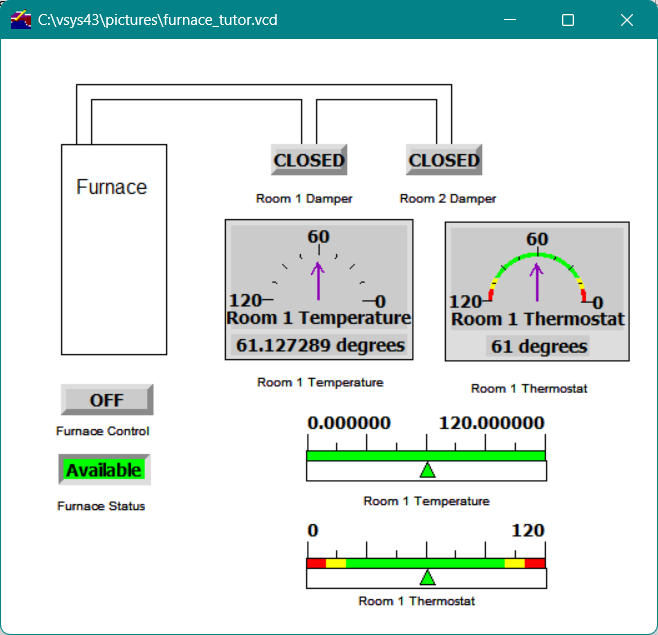
This tutorial instructs you in using Vaccess to create a simple Vsystem database to monitor and control the functions of a furnace. You will use Vdraw to create a furnace control display window and then activate it, as shown in Figure 2, by linking it to the database.
You will also learn how to link the alarm manager to the database and how to write a script within the Vscript environment to control the database.
Figure2 - Active Vdraw control display window
Each chapter listed below instructs you in how to use a particular Vsystem component to create the overall furnace application.
-
Chapter 2 : You will create an ASCII file that defines and generates the Vsystem database.
-
Chapter 3 : You will create and activate the control display window shown in the illustration above.
-
Chapter 4 : You will edit a database channel with the Db_view utility.
-
Chapter 5 : You will monitor alarms and warnings for a channel with Valarm.
-
Chapter 6 : Using Vscript, you will write a script that controls the active furnace display.
-
Chapter 7 : You will create an archive file with Vlogger and view the archived data with Vtrend.